
Timeline Scale
The Timeline Scale enables the user to control the scale for the time units. If your simulation has many events in a small period of time, selecting a larger scale will allow you to see and separate the different events. If your simulation runs few events over a long period of time, selecting a smaller scale will display more of the simulation in the timeline window.
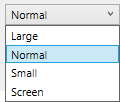
The available settings are:
-
Normal - standard setting.
-
Large - scale the results to 400% of the standard setting.
-
Small - scale the results to 50% of the standard setting.
-
Fit To Screen - fit the timeline results to a single screen.