

The Set Permissions command, accessed on the Data ribbon or on the right-click context menu, enables you to control access and modifications to entities and other items in your GENESYS project. To set permissions for an entire project, see the Set Project Permissions topic.
A window displays where you can add, remove and modify permissions.
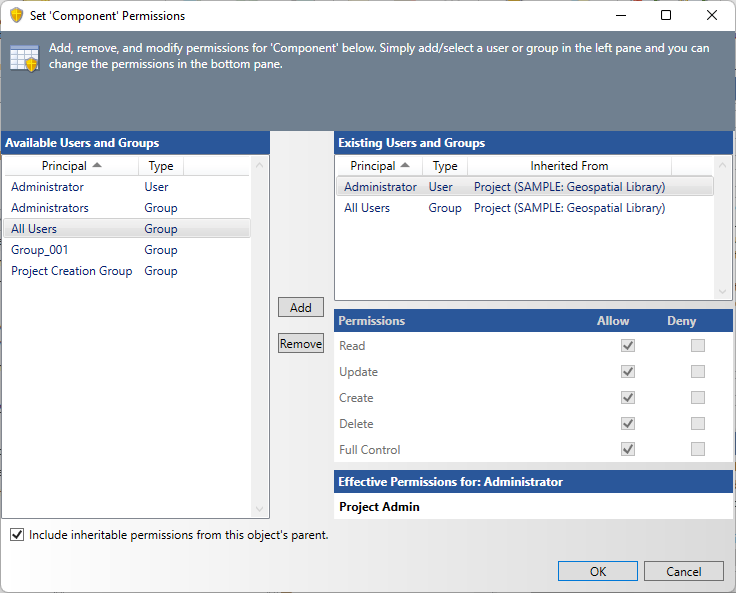
The permissions available are:
-
Read - the user has permission to read the project. If a user does not have read permission, the project will not show up in any list of projects (it will be as if the project did not exist).
-
Update - the user has permission to change the contents of the project (entities, relationships, attributes, structures). If the user does not have update permission for the project, the user is prohibited from making any changes regardless of the permissions on individual entities and attributes.
-
Create - the user may create new entities and folders in the project.
-
Delete - the user may delete entities and folders in the project.
-
Full Control - the user may grant and restrict access to the project, import data into the project, or delete the project. Any user granted administrator permission for a project is essentially a super user for the project and can access any data regardless of other permission settings within the project..
All users and groups with permission to the item in the project will be shown in the Existing Users and Groups list. To manipulate the permissions and denials for a user or group, select the user/group in the list pane and check/uncheck the desired items. Users and groups not currently explicitly granted permission to the entity are shown in the list on the left. To grant permission to a new user or group, use the right arrow to transfer the user onto the permission list.
|
NOTE: |
What permissions are required to edit permissions for project items? To edit permissions for project items, you must have Full Control permission for the project. |
|
NOTE: |
Following standard best practices regarding assigning permissions, it is far better to grant permissions to groups than to individual users. Over time, this approach proves far more manageable and scalable. As new team members are added to the project, they can simply be added to the appropriate group. As team members leave the project, they can be removed from the group. This is far simpler than changing permissions for individual users across the scope of a project. |