

The Attribute Properties command, accessed on the right-click context menu, enables you to modify the definition of the selected attribute. GENESYS opens a dialog enabling you to completely define the attribute. If the selected attribute is inherited from a superclass, a restricted form of the dialog is opened which displays all of the properties but limits the subset of properties which can be changed.
|
NOTE: |
Double-clicking on an attribute is a shortcut for opening its Properties dialog. |
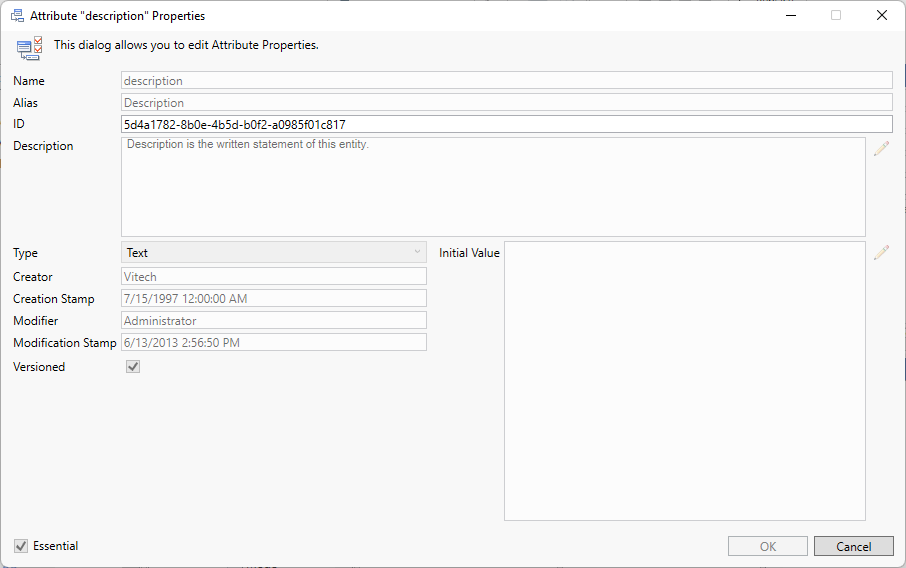
The upper portion of the attribute definition dialog display the basic properties associated with the attribute.
-
Name - the internal name of this attribute. The name is used to reference the attribute throughout GENESYS - in data sets, filters, sort blocks, icon templates, reporting, and more. By convention, attributes are shown in camel case.
-
Alias - the label associated with this attribute in GENESYS's user interface. Aliasing allows you to tailor the underlying schema and language of MBSE to your specific project and domain without incurring additional integration or compatibility costs. By convention, aliases are shown in title case. If no alias is specified, the attribute name will be used.
-
ID - a unique identification number for the attribute.
-
Description - a description of the attribute and its use. By providing descriptions for the schema classes, attributes, parameters, and relations, the schema becomes self-documenting. This is an important guide in introducing new project team members to your project meta-language.
-
Type - the class of value for the attribute:
-
Boolean - true or false.
-
Collection - an ordered list of values. The value type attribute defines the class of value included in the list.
-
Date - a date is a value that represents a calendar day.
-
DateTime - an object that represents a date and time.
-
Enumeration - a selection from a defined list of options. The value type attribute defines the class of value for the list of options. The enumeration pane defines the options themselves and the order presented.
-
Float - a floating point number. GENESYS's implementation conforms to the IEEE standard for double precision with a maximum exponent of 309.
-
Hierarchical Number - a hierarchical reference concatenating one or more integers and/or alphabetic character sequences separated by periods.
-
Integer - a whole number ranging between -2147483648 and 2147483647.
-
Number Spec - a powerful representation of a numerical value frequently used in simulation. A specific attribute value can be a constant value (float), a random number specification, or a script specification to execute to generate a numerical value.
-
Reference Spec - an external reference to a resource (file, website, email address, etc.) outside of GENESYS.
-
Script Spec - a GENESYS script to generate and return results.
-
String - a traditional single line array of characters.
-
Text - multi-line formatted text. Text values are limited to 100KB.
-
-
For either Type Collection or Enumeration: Value Type - the specific class of value stored in a collection or enumeration.
-
Initial Value - the value assigned to the attribute when an entity is created. Most frequently, this value is nil. However, it can be set to any initial value desired. Note that for enumerations, an initial value is required.
-
For Type Enumeration: Possible Values - the list of possible values defined for an enumeration attribute. This pane allows you to add and remove values, change existing values, and change the order.
-
Creator - the name of the user who created the attribute.
-
Creation Stamp - the timestamp when the attribute was created.
-
Modifier - the name of the user who last modified the attribute.
-
Modification Stamp - the timestamp when the attribute definition was last changed.
-
Versioned - a flag indicating if versions of this attribute should be maintained whenever the value is changed. If versioning is enabled at the project level, this flag indicates which specific attributes will version values reflecting the evolution of the attribute over time along with the individuals who made the changes.
-
Essential - a flag indicating if this attribute is essential to GENESYS. This flag is set by Vitech as part of the baseline schemas and cannot be changed. You cannot delete, rename, or change the value type of essential attributes. However, you can modify the alias or description to align with your project needs, and you can set initial values and enumerations.
|
NOTE: |
If the attribute being displayed is inherited from a superclass, you will see all of the properties, but you will only be able to edit selected properties at the subclass level. In particular, you can set whether the attribute should be versioned, define the initial value, and change enumerated values (if applicable) when the attribute is used for the subclass. This helps maintain the consistency of the schema language while providing extensibility at lower levels. |
|
CAUTION! |
GENESYS does not freeze the schema when you begin your project work. Therefore, if your project currently has data (entities, relationships, attributes, and parameters), modifying existing portions of the schema will transform any existing data. For example, if you change an attribute type, GENESYS will attempt to transform any existing attribute values to the new value.
Of particular note, if you wish to change an existing enumeration value, use the Change button and enter the new value. This will transform any existing attributes to the new value. If you delete the value and add a new one, GENESYS cannot map the old value to the new. Instead, any attribute using the old value will be reassigned the initial value during migration. |