

The Parameter Properties command, accessed in schema mode, enables you to modify the definition of the selected parameter. GENESYS opens a dialog enabling you to completely define the parameter.
|
NOTE: |
Double-clicking on parameter in the parameters list in the schema view is a shortcut for opening its properties dialog. |
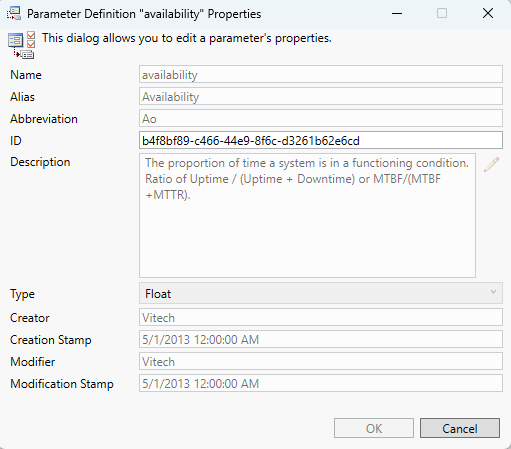
The parameter definition dialog display the basic properties associated with the parameter.
-
Name - the internal name of this parameter. The name is used to reference the attribute throughout GENESYS - in data sets, filters, sort blocks, icon templates, reporting, and more. By convention, attributes are shown in camel case.
-
Alias - the label associated with this attribute in GENESYS's user interface. Aliasing allows you to tailor the underlying schema and language of MBSE to your specific project and domain without incurring additional integration or compatibility costs. By convention, aliases are shown in title case. If no alias is specified, the parameter name will be used.
-
Abbreviation - the abbreviation for the parameter as used on nodes.
-
Description - a description of the attribute and its use. By providing descriptions for the schema classes, attributes, parameters, and relations, the schema becomes self-documenting. This is an important guide in introducing new project team members to your project meta-language.
-
Type - the class of value for the parameter
-
Date - a date is a value that represents a calendar day.
-
DateTime - an object that represents a date and time.
-
Float - a floating point number. GENESYS's implementation conforms to the IEEE standard for double precision with a maximum exponent of 309.
-
Integer - a whole number ranging between -2147483648 and 2147483647.
-
String - a traditional single line array of characters.
-
-
Creator - the name of the user who created the parameter definition.
-
Creation Stamp - the timestamp when the parameter definition was created.
-
Modifier - the name of the user who last modified the parameter definition.
-
Modification Stamp - the timestamp when the parameter definition was last changed.
|
CAUTION! |
GENESYS does not freeze the schema when you begin your project work. Therefore, if your project currently has data (entities, relationships, attributes, and parameters), modifying existing portions of the schema will transform any existing data. For example, if you change a parameter type, GENESYS will attempt to transform any existing parameter values to the new value. |