


The Insert Loop command inserts a loop construct at the insertion point for an Activity diagram, a FFBD, or an EFFBD. This command is available either from the Insert submenu of the right-click context menu or by dragging the Loop construct from the Insert tab of the diagram Toolbox to the desired insertion point.
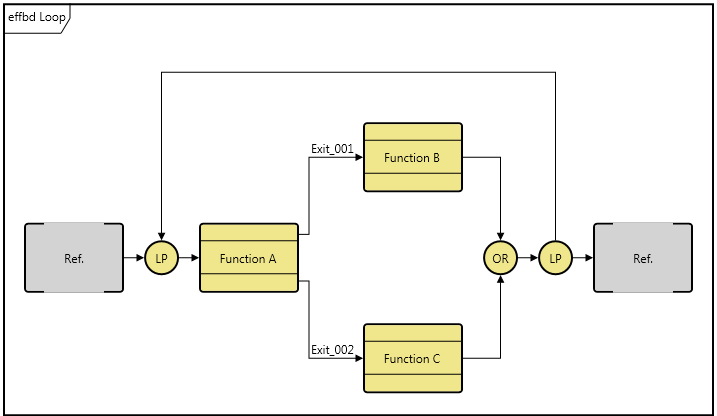
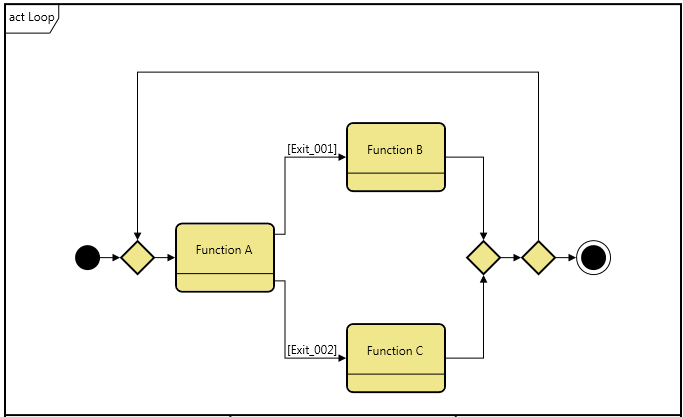
If you insert by using the Toolbox commands, GENESYS will insert based upon your current selection. If a node or construct is selected, GENESYS will insert before the selected object. If a branch is selected, GENESYS will insert at the end of the branch. If nothing is selected, GENESYS will insert at the end of the main branch.
|
NOTE: |
When inserting a loop, the loop construct is added to the structure but no corresponding loop condition (noting the condition for remaining in the loop) is specified. Use the Edit Annotation command or double-click the loop construct to specify the loop condition. |