

The Edit Attribute Order command, accessed on the right-click context menu when editing the schema under the Schema ribbon, allows you to specify the order in which property sheets will list attributes for the given class. When a new class is created, the initial attribute order copied from its superclass. After creation, the attribute order is maintained independently such that subsequent modifications of the superclass attribute order will not affect the subclass. In this way, each class may maintain its individual attribute order.
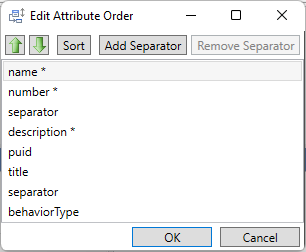
The dialog used to specify the attribute order is a variant of GENESYS's standard dialog for sorting collections of objects. The options include:
-
Up arrow - clicking the up arrow will move the selected attribute earlier in the order.
-
Down arrow - clicking the down arrow will move the selected attribute later in the order.
-
Sort - clicking the Sort button will sort the collection alphabetically.
-
Add Separator - adding a separator adds a line on the property sheet between the specified attributes. This helps visually group attributes within what can become a long list of properties.
-
Remove Separator - with a separator selected, this allows you to remove the selected divider.