

(Available in Base Schema v70 or earlier that contains the Interface class)
The Interface N2 (pronounced "N-squared") diagram represents the logical connections within a system or system segment. Part of the physical architecture representation set, the Interface N2 diagram presents a high-level structured representation of logical connectivity. It is complemented by the physical N2 diagram which presents a high-level view of the physical connectivity between system components. What these diagrams lack in technical detail (and style) of various block diagram representations, they deliver in simplicity and clarity.
The Interface N2 diagram is available for entities in the Component class (as well as any other subclasses of ImplementationUnit).
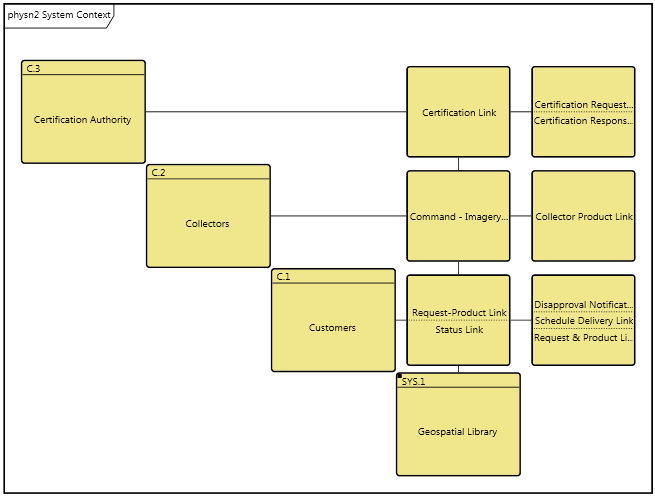
On an Interface N2 diagram, the child components are shown on the main diagonal forming an N x N matrix of cells. Interfaces that connect a pair of components are shown on the off-diagonal. Since the Interface N2 diagram focuses on logical connection as opposed to directionality, there are no arrows shown on the Interface N2 diagram. Instead, the diagram simply represents who is joined to whom at a logical level.
The lack of directionality means that half of the off-diagonal locations are redundant. If A is joined to B, we know that B is joined to A. Rather than showing this information twice, only the upper half of the diagram is used. The lower off-diagonal cells will be empty by definition.
GENESYS' N2 diagram has been extended to display external interfaces as well. Connections appearing in the right-hand column are interfaces that are either (i) joined to a component not displayed on this diagram or (ii) are not joined to any additional components in the system model. This extension of classic N2 diagrams provides valuable context but can be toggled off, as desired.
A physical N2 diagram displays only the connections at that level (interfaces lower in the decomposition are not displayed). The decomposition of components is not considered when placing an interface in a cell. If an interface is joined to both a component on the diagram and a subcomponent of one of those components, it will be shown as an external interface. This maintains consistency with the various block diagrams.
|
NOTE: |
The order of components on an Interface N2 diagram is the sorted order of the children. If desired, you can manually change and manage the order using the Change Node Position command. This can be useful for clustering analysis. |
Diagram Options
In addition to the classic diagram options, the Interface N2 diagram settings include:
-
Show External Nodes - controls whether or not to display interfaces which are joined to components on the diagram but do not have a second connected component on the diagram. Showing external interfaces helps identify unconnected interfaces or interfaces that cross component boundaries.
-
Use Grid Representation - controls whether a matrix layout should be used in place of the traditional node and connecting line representation.
Toolbox Insert
The constructs and key entities tabs allow you to quickly develop your Interface N2 diagram, while the all entities tab enables you to relate your components and interfaces to the remainder of your system definition.
Constructs
-
New Child - drop onto the diagram background to add a new component as part of the diagram composition (built from)
-
Children - drop onto the diagram background to add an existing component as part of the diagram composition (built from)
-
New Connection - drop onto any diagram node to create a new connection (interface) that joins to the node
-
Connections - drop onto any diagram node to relate an existing connection (interface) using the joins to relation
Utilities
-
Image - drop onto the diagram to insert a new picture
-
Note - drop onto the diagram to insert a new note (descriptive text in a note icon)
-
Shapes - drag one of the shapes from the toolbox and drop onto the diagram to insert a new shape
Key Entities
-
Component - drop an existing component onto the diagram background to add it as part of the diagram composition (built from)
-
Interface - drop an existing interface onto a node to relate it to the node using the joins to relation
All Entities - all classes and entities in the system model, allowing you to drag any entity on top of a diagram node to establish relationships with the balance of your system model
Context Menu Commands
-
Arrange
-
-
Submenu listing entities
-
Tips and Tricks
-
One of the classic uses of an N2 diagram is clustering analysis as an input to packaging decisions. Using a diagram shape in conjunction with the traditional (non-grid) layout is a good way to graphically indicate clusters.
-
The grid representation of an N2 diagram is not the classic systems engineering representation, but it may be better understood by non-systems engineers. In addition, the grid representation provides more space for icon labels.
-
Since connection nodes on an N2 diagram can represent multiple connections, occasionally there will be more connections in a node than can be displayed. Double-clicking on a connection node presents a pop-up list of all items represented by the node.