

The New Parameter command defines a new parameter for the selected class (which will not be inherited by all of its subclasses). Parameters enable the project team to expose critical design-dependent and design-independent values for management and manipulation while seamlessly embedding them in text attributes for the convenience of natural language. Parameters may be pre-defined by the project administrator or may be user-defined at "runtime" whenever a project team member decides that a new value should be independently tagged and managed. As critical design aspects, versioning is always enabled for parameters (when versioning is enabled for a project).
When creating a new parameter, you will be prompted to specify a name and type for the parameter before proceeding. Optionally, you can also specify an alias, abbreviation, and description.
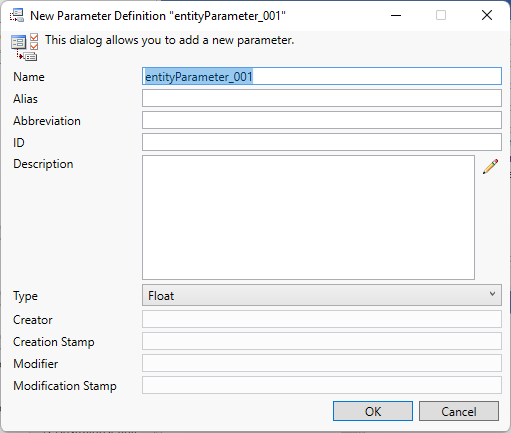
The parameter definition dialog display the basic properties associated with the parameter.
-
Name - the internal name of this parameter. The name is used to reference the attribute throughout GENESYS - in data sets, filters, sort blocks, icon templates, reporting, and more. By convention, attributes are shown in camel case.
-
Alias - the label associated with this attribute in GENESYS's user interface. Aliasing allows you to tailor the underlying schema and language of MBSE to your specific project and domain without incurring additional integration or compatibility costs. By convention, aliases are shown in title case. If no alias is specified, the parameter name will be used.
-
Abbreviation - the abbreviation for the parameter as used on nodes.
-
ID - the identification number assigned to the parameter
-
Description - a description of the attribute and its use. By providing descriptions for the schema classes, attributes, parameters, and relations, the schema becomes self-documenting. This is an important guide in introducing new project team members to your project meta-language.
-
Type - the class of value for the parameter
-
Date - a date is a value that represents a calendar day.
-
DateTime - an object that represents a date and time.
-
Float - a floating point number. GENESYS's implementation conforms to the IEEE standard for double precision with a maximum exponent of 309.
-
Integer - a whole number ranging between -2147483648 and 2147483647.
-
String - a traditional single line array of characters.
-
-
Creator - the name of the user who created the parameter definition.
-
Creation Stamp - the timestamp when the parameter definition was created.
-
Modifier - the name of the user who last modified the parameter definition.
-
Modification Stamp - the timestamp when the parameter definition was last changed.
After creation, the parameter definition can be changed using the Parameter Properties command.
|
NOTE: |
By convention, parameters are named using camel case. This is not required, but for consistency of use and ease of utility operations such as scripting, it is recommended. Title case and spaces can be used in the attribute alias. |
|
NOTE: |
When should I create a new attribute vs. a new parameter? Attributes and parameters are very similar - both exist at the individual entity level, both permission controlled, and both most frequently managed through the property sheet. Attributes are descriptive aspects of the design (description, rationale, etc.) and, once defined, are present for every entity in a given class. Parameters are values - generally numeric with units - that define the design and, while available for all entities of a given class, are only present where specifically added to a given entity. |