
The Relations item in the Schema section of Prroject Explorer enables you to view the relations defined in your schema (the metadata for your project). If the project is in schema mode, you can create and modify relations (also called relationship definitions). If the project is in database mode, the relation information will be displayed in read-only mode allowing you to review, but not change, the schema. This provides a handy online reference to the System Definition Language (SDL) with easy access to all schema descriptions to better understand the intended usage.
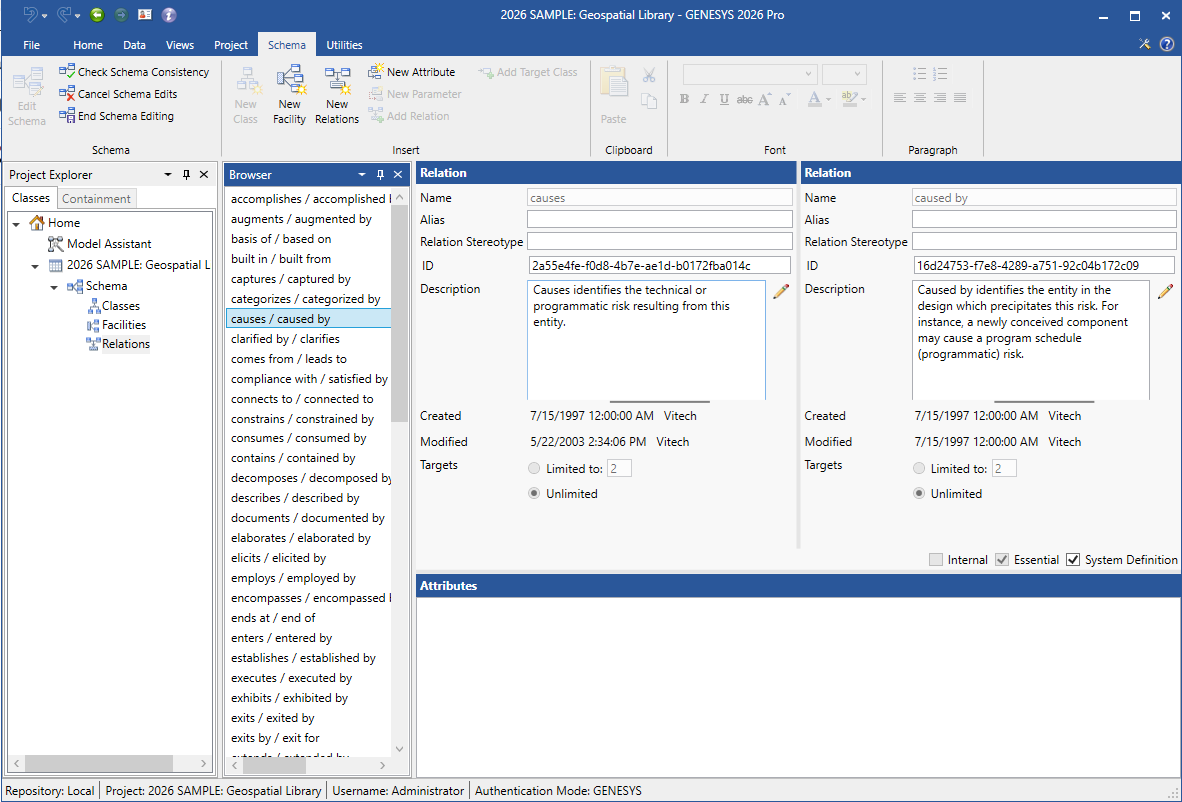
Relations
The relations pane lists all defined relation pairs in alphabetical order. When you select a relation pair, the information for both of the selected relations are shown in the property sheet.
Properties
The property sheet shows the properties for the selected relations as well as the defined attributes. The properties include:
-
Name - the unique identifier of the selected relation. By convention, relation names are shown in lower case with spaces, but there are no formal restrictions on the name.
-
Alias - a project-specific public label to use in place of the formal name. The alias allows you to tailor the presentation of the language without affecting scripts or data interchange.
-
Relation Stereotype - a project-specific public label to use on SysML views. Often times, SysML representations have specific nomenclatures, and using the corresponding SysML terminology improves understandability.
-
Description - basic overview of the relation with intended usage. All relations must have a description. This makes the schema self-documenting which is an aid to all project team members.
-
Created - date, time, and name of the user who created the relation. This property is set when the relation is created and cannot be modified.
-
Modified - date, time, and name of the user who last made changes to this relation.
-
Targets - the type and limitations of the selected relation. A relation can either have a single target (enforcing uniqueness), have a limited number of targets capped by a number you specify, or have an unlimited number of targets. Most relations have an unlimited number of targets, but there may be circumstances where the other relation types are more appropriate.
-
Internal - a flag indicating whether this relation is computed and maintained automatically by GENESYS. Internal relations are displayed but cannot be directly edited by the user. For example, the decomposed by relation for a function is derived from the structure shown in an activity diagram or EFFBD.
-
Essential - a flag indicating whether or not this relation is required by GENESYS. Essential relations cannot be renamed or deleted.
-
System Definition - a flag indicating whether this relation is a part of the controlled system definition. Those relationships tagged as part of the system definition cannot be changed if either the source or target entity is locked.
-
Attributes
The attribute pane lists all attribute definitions for the selected relation pair in alphabetical order.
Double-clicking on an attribute opens the Properties dialog so that you can define the attribute.
Relation Commands
Relation Browser
Attributes pane
Tips and Tricks
-
The strength of the systems database is its concrete language in which each term is clearly defined regardless of context. Therefore, it is highly recommended that you extend the schema with care, being sure not to make the SDL context-sensitive.
-
The names of classes, attributes, relations, and facilities are used for internal reference and are shown in database mode only if aliases have not been specified. Therefore, if you wish to change the name shown in the database mode, modify the alias. Though the name of a definition marked as essential cannot be changed, an alias can be applied to tailor the GENESYS specification language to your particular project or application.
-
If you have added numerous aliases to your schema, it may be easier to search by alias than by name.