

The Replace command will search for entered text in the text and string attributes of the selected entity and then replace that text with other entered text.
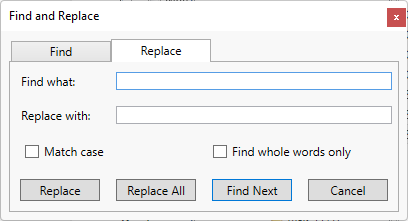
Options
-
Find what - the text you want to find.
-
Replace with - the text you want to change the found text to.
-
Match case - find the text as entered, otherwise any variation of the text will be found (e.g., finding test would highlight Test).
-
Find whole words only - will not find the text if it is part of a bigger word (e.g., finding test would not highlight testing).
Commands
-
Replace - replace the highlighted text with the string from the replace with field.
-
Replace All - replace all occurrences of the text found with the replacement text without confirmation.
-
Find Next - Keep the highlighted text and find the next occurrence of the search text.
-
Cancel - close the dialog with no other action taken.