
Teams derive a great deal of benefit simply from adopting a model-based approach. They expose their system model for greater team alignment and understanding (in document-centric approaches, the model is still there, its simply obscured by the communication medium). They gain insight from the thought process of developing the model. They gain richness and explicitness not generally achievable in document-centric approaches. Plus they achieve savings in countless ways from increased productivity, early detection of errors, improved and streamlined impact analysis, and the elimination of production costs for specifications. All that said, the greatest value of the model-based approach comes not from developing the model but from exploiting the model.
To complement the embedded ability to directly simulate your model for dynamic verification, GENESYS includes a rich framework of embedded model diagnostics. With a library of over 70 completeness checks, countless consistency diagnostics, and a customizable framework for including your own rules, these model diagnostics go far beyond simple diagram-centric checks. Put simply, these diagnostics aid in the bookkeeping and validation of systems engineering, freeing you to focus your valuable time on the critical inspiration of systems engineering.
Select the Diagnostics tab on the bottom portion of the entity property sheet to access the diagnostic features.
The first component of model diagnostics the completeness checks evaluates your model completeness on the fly. Much like TurboTax® dynamically informs you of missing data, GENESYS will tell you which key attributes and relationships have not yet been completed. Of course, not all rules are valid on day one of your project. As your design matures, your completeness checks should become more sophisticated and robust. With this in mind, for each project you specify which level of script you wish to check against. There are four levels of checking from none to rich to choose from. These can also be expanded for cases that are specific to your needs and desires.
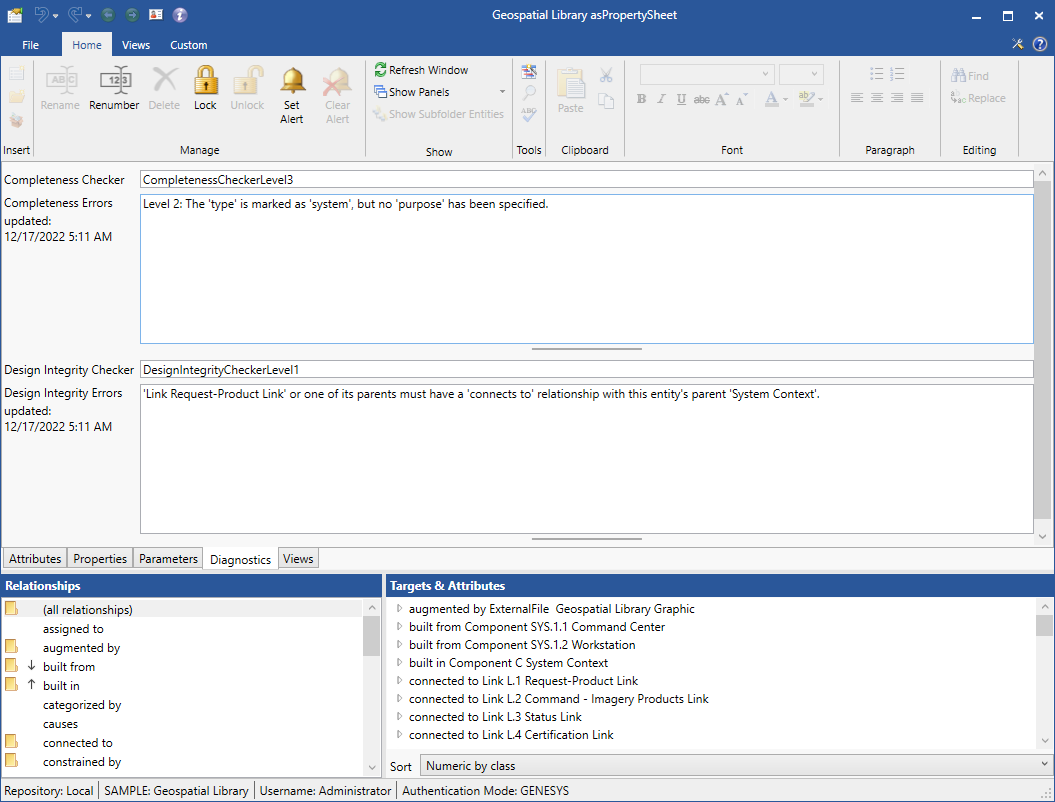
The second component of model diagnostics the design integrity checks is a pre-defined and extensible set of script-based rules to highlight inconsistencies in your model. As you work across the systems engineering domains or across levels of detail, its trivial to introduce inconsistencies as your problems become more complex. With the push of a button, you can highlight these issues for a given entity, a folder, a package, or the entire project. Unchecked, these inconsistencies can doom your project or the system you produce. Addressed, these inconsistencies can be easily managed.
Moving beyond the results embedded in individual property sheets:
-
A pre-defined filter titled Diagnostic Errors quickly identify those entities with diagnostic issues.
-
The Diagnostics Results Report outputs diagnostic errors associated with the selected entities in a listing format by entity. You can run this report against a package, a collection of classes, or the entire database and select whether you wish to include completeness errors and/or design integrity errors.
-
The Diagnostic Table Report prompts you for what diagnostic information to output and what entities to process. It then generates a tabular output indicating which entities have which completeness and design integrity issues.
One of the rules of systems engineering is that it costs 3 to 10 times as much to correct an error for each successive stage it moves through the life cycle (assuming it can still be resolved without degraded system performance). Helping to identify these issues early on and expose them for your review is priceless.
Additional Information